If you’re planning a new Home Assistant setup, one of the first decisions you’ll face has nothing to do with Zigbee, automations, or dashboards.
It’s this:
Should you run Home Assistant on dedicated hardware or inside a virtual machine (VM)?
Fortunately, there isn’t a wrong answer.
Home Assistant runs well in both environments. Whether you install it on a purpose-built appliance like Home Assistant Green, a Raspberry Pi, a mini-PC, or inside a Proxmox VM, you can build a fast, reliable smart home.
The better question is this:
How do you want to maintain, protect, and grow your system over time?
That’s where the decision becomes more interesting.
I’ve run Home Assistant for years and currently run Home Assistant Operating System (HAOS) inside a Proxmox virtual machine. While I generally prefer the VM approach, I don’t think it’s automatically the best answer for everyone. Let’s walk through the tradeoffs.
This page contains affiliate links. If you purchase an item using an affiliate link I will receive a small commission at no cost to you. Affiliates do not influence my recommendations. Read my disclosures for more information.
What Do We Mean by Dedicated Hardware and a VM?
Before comparing them, it helps to define what we mean.
Dedicated Hardware
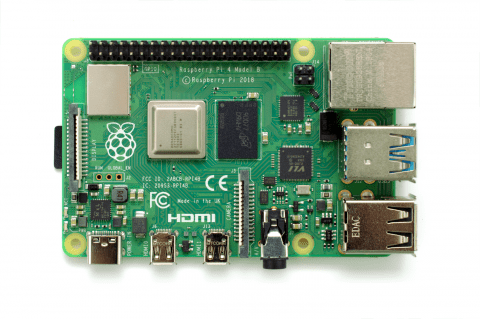
Dedicated hardware means Home Assistant runs on a device devoted primarily to Home Assistant.
Common examples include:
This is often the simplest approach. The device behaves more like an appliance than a server. You install Home Assistant, configure it, and largely forget about the underlying platform.
Virtual Machine (VM)

A VM approach means Home Assistant runs inside a virtual machine hosted on another system.
Common hosts include:
- Proxmox
- ESXi
- Hyper-V
- Unraid or similar virtualization platforms
In this setup, Home Assistant shares hardware with other workloads. For example, my Proxmox server runs Home Assistant alongside other services and containers.
This approach adds flexibility, but also some complexity.
Why Many People Choose Dedicated Hardware
Dedicated hardware remains popular for good reason. For many homeowners, it’s the shortest path between:
“I want a smart home”
and
“I have a working smart home.”
A preinstalled option like Home Assistant Green removes much of the work involved with virtualization or server management.
Benefits include:
- Simple setup
- Fewer moving parts
- Appliance-like behavior
- Less infrastructure to manage
- Lower learning curve
If your goal is:
“I want Home Assistant to feel like a thermostat or router”
dedicated hardware has real appeal.
This is especially true if you don’t already run a homelab.
The Home Assistant team has done a good job making dedicated hardware approachable and reliable.
A Raspberry Pi 4 can still work as well, although I tend to lean toward the more appliance-like options today or a small mini-PC if you want additional headroom.
If you’re evaluating platforms, I put together a guide covering the best choices for Home Assistant hardware, including dedicated appliances and mini-PC options.
Why Many Power Users Prefer a VM
This is where my own preference starts to show. I like running Home Assistant in a VM. Not because it’s faster. Not because it’s more “advanced.” Mostly because it gives me flexibility and peace of mind.
Home Assistant simply doesn’t need a huge amount of computing power. So dedicating an entire computer to it can sometimes feel wasteful, particularly if you already have virtualization infrastructure available.
Running HAOS in a VM gives you several advantages.
Snapshots and Recovery
This is probably the biggest one.
Before major upgrades or configuration changes, you can snapshot the VM.
If something breaks:
That’s hard to overstate.
Home Assistant’s own backup system is excellent—and I use it—but VM snapshots add another layer of protection.
Easier Migration
Need new hardware? VMs make that easier. Instead of rebuilding from scratch, you can often:
- migrate
- restore
- reattach devices
- continue working
This becomes more valuable as your smart home grows.
Better Hardware Utilization
Many of us already run:
- NAS systems
- Docker containers
- Proxmox hosts
- homelab infrastructure
In that situation, letting Home Assistant share existing resources makes sense.
One modest server can support:
- Home Assistant
- MQTT
- containers
- utility services
- automation tools
…all without stressing the hardware.
Scaling Later
Home Assistant itself is lightweight, but some workloads are not.
Things like:
- camera processing
- AI integrations
- dashboards
- companion services
can change your requirements over time.
VMs make resource adjustments relatively painless.
Need more RAM? Allocate it. Need more disk? Resize it. That flexibility is nice.
My Experience Moving to HAOS in Proxmox

For years I ran Home Assistant Core in a Python virtual environment.
It worked.
But over time, maintaining it became increasingly annoying.
Home Assistant eventually began deprecating older installation methods, and every major update seemed to involve:
- rebuilding Python environments
- fixing dependencies
- dealing with manual maintenance
That became harder to justify.
I documented the full process in my article about migrating Home Assistant from a Python virtual environment to HAOS in Proxmox.
The short version? It was worth it.
My older setup required more manual maintenance and increasingly felt like something I had to manage rather than simply use. HAOS simplified upgrades and made everything officially supported.
The migration itself went surprisingly well.
I:
- snapshotted the old VM
- created a new HAOS VM
- restored from backup
- reassigned USB devices
- worked through a few hiccups
The biggest issues involved:
- Z-Wave rebuilding
- reauthentication of some integrations
- a few configuration tweaks
But the backups worked remarkably well and preserved most of my setup.
Afterward, updates became dramatically easier. Home Assistant upgrades now happen from the UI and simply work. Even HAOS updates are integrated into the process. That was a major improvement.
And honestly, this line from my migration article still summarizes my philosophy pretty well:
“The true test will be if anyone in my family notices anything. I doubt they will—and that’s exactly how it should be.”
No one has noticed. Reliable home technology should fade into the background.
Reliability and Recovery
People often assume dedicated hardware is automatically more reliable. I’m not sure that’s always true. Both approaches can be very dependable.
The real difference is how they fail and how you recover.
Dedicated Hardware Recovery
With dedicated hardware, recovery generally depends on:
- Home Assistant backups
- replacement hardware
- restore process
This works well as Home Assistant backups are genuinely excellent.
But if a device dies unexpectedly, recovery may involve:
- replacement hardware
- SD card restoration
- reconfiguration
That isn’t terrible, but it takes time.
VM Recovery
This is where VMs shine. You still use HA backups.
But now you also have:
- VM snapshots
- hypervisor backups
- migration tools
- hardware portability
If your host hardware changes, recovery is often much simpler. For me, snapshots are the biggest win. They reduce anxiety around upgrades and experimentation.
Maintenance and Updates
Maintenance is one area where dedicated hardware may have an advantage. There’s simply less infrastructure involved.
With dedicated hardware:
- update Home Assistant
- update HAOS
- done
That simplicity matters.
With a VM, you have another layer: the virtualization host. That means:
- Proxmox updates
- host patching
- VM management
So yes, maintenance can be slightly higher.
On the other hand, if you already maintain virtualization infrastructure, this may not feel like additional work at all.
In my case, I already run Proxmox and other services. Home Assistant becomes one more VM rather than one more computer to manage.
Performance, Cost, and Power
Performance usually isn’t the deciding factor. Home Assistant is efficient. For most people dedicated hardware or a VM will feel equally responsive.
The more meaningful discussion is around:
- cost
- power
- resource utilization
Dedicated Hardware
Advantages:
- predictable power use
- simple sizing
- low idle draw
- purpose-built options available
A Home Assistant Green uses very little power and is easy to justify.
VM Approach
If you already have a host VM often wins. Instead of:
- buying another computer
- powering another system
…you reuse existing infrastructure.
Of course, if you need to build a Proxmox server solely for Home Assistant, the equation changes. At that point, dedicated hardware probably makes more sense, unless you’re planning on other VMs anyway.
If you’re exploring virtualization hosts, my article covering Proxmox small form factor hardware may help.
I also run Home Assistant on a Beelink mini-PC platform and have written about my experience with the Beelink EQi13 Pro.

Dedicated Hardware vs VM: Pros and Cons
Dedicated Hardware
Pros
- Simple setup
- Beginner friendly
- Appliance-like
- Less maintenance
- Fewer moving parts
- Strong fit for Home Assistant Green
Cons
- Less flexible
- No VM snapshots
- Hardware dedicated to one task
- Migration can be more manual
- Scaling may require new hardware
Virtual Machine
Pros
- Snapshots
- Easy recovery
- Better hardware utilization
- Migration flexibility
- Easy scaling
- Fits existing homelabs well
Cons
- Learning curve
- Requires VM knowledge
- Host maintenance required
- More infrastructure involved
- Slightly more complexity
How to Decide
If you’re still unsure, here’s the short version.
Choose Dedicated Hardware If:
- You want simplicity
- You’re new to Home Assistant
- You don’t run a homelab
- You want appliance-like reliability
- You prefer minimal maintenance
Home Assistant Green is honestly a strong answer here.
Choose a VM If:
- You already run Proxmox or virtualization
- You’re comfortable with VMs
- You value snapshots and recovery
- You want efficient hardware use
- You enjoy flexibility and tinkering
This is where I land. But I recognize it isn’t universal.
Final Thoughts
There isn’t a single correct answer here. Home Assistant runs well on dedicated hardware and in virtual machines. The better choice depends less on Home Assistant itself and more on:
- your comfort level
- your infrastructure
- your long-term goals
My default recommendation is this: If you already run virtualization infrastructure or are willing to learn it, I think Home Assistant in a VM is hard to beat. The flexibility, snapshots, and portability are powerful advantages.
But if you want the simplest, lowest-friction experience possible, dedicated hardware remains a very good—and often very smart—choice.